
Little love notes, right on their Home Screen.
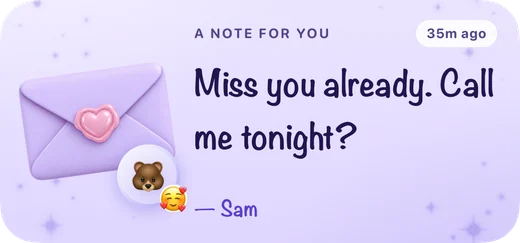
Midnight’s Love Note widget puts a short, handwritten-style note from you on your partner’s iPhone Home Screen, and the Miss You widget gives you both a heart to tap whenever you think of each other. Here is how they work, and what to write when nothing comes to mind.
What the Love Note widget shows
Love Note shows the latest note your partner sent you, in a handwritten-style face, with their name, their face and how long ago it arrived. A note can be up to 140 characters, and each new one replaces the last, so the widget always holds the most recent words. Until the first one arrives, it simply says there is no note yet.
How sending a note works
- Open Midnight and tap Send, the button in the middle of the tab bar.
- Choose Note and write something, or tap one of the suggestions to start from.
- Tap Send. While you type, a preview shows the note as it will look on their widget.
Their Love Note widget picks up the note, and if they allow notifications, they also get one saying a note is waiting. The notification never shows your words; those stay on the widget. Midnight sends the note straight away, but iOS decides when Home Screen widgets refresh, so it can take a little while to appear.
What the Miss You widget shows
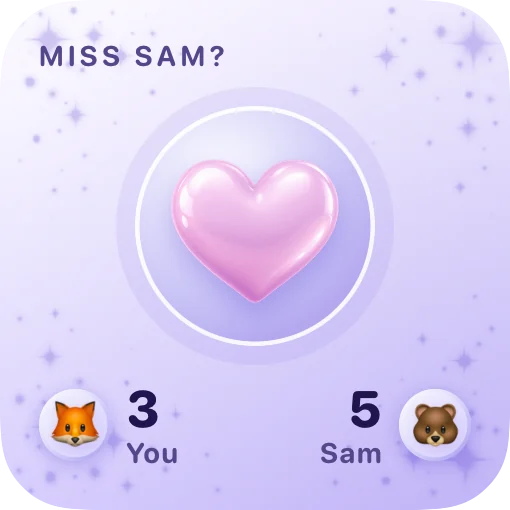
Miss You is a heart you can tap right on your Home Screen. Each tap sends a miss-you to your partner without opening the app, and their widget counts it. The small size shows the heart with today’s taps for each of you. The medium size shows how many times your partner has missed you in total, today’s count for both of you and when the last one came in.
Today’s counts start again at midnight; the total keeps growing. In the app, Send then Miss you lets you pick an emoji for your taps (🥺, ❤️, 😘, 🫶 or 🤗) and shows the all-time tally for the two of you. Your partner may also get a notification that you miss them.
36 short love notes for every moment
Short beats clever. A line or two reads best at a glance, and nobody expects poetry on a Home Screen. Borrow any of these, or let them nudge you toward your own.
In the morning
- “Good morning, sleepyhead. I already miss your cold feet.”
- “First thought today: you. As usual.”
- “You looked so peaceful I didn’t wake you.”
- “Go be brilliant. I’ll be here after.”
- “Coffee’s on me tonight. Have a good one.”
- “Rise and shine, my favorite person.”
Before an exam or a big day
- “You’ve prepared for this. Go show them.”
- “Deep breath. You know more than you think.”
- “Whatever happens today, I’m proud of you.”
- “Pizza tonight, win or lose.”
- “I believe in you more than I believe in coffee.”
- “Text me the second you’re out.”
When you’re far apart
- “Same moon, different windows.”
- “Your hoodie still smells like you. Not giving it back.”
- “Call me when you land?”
- “A few more sleeps until I see you.”
- “Wish I could steal you for a walk right now.”
- “Saving all my hugs for the airport.”
After a fight
- “I’m sorry. Can we talk tonight?”
- “Still on your side. Always.”
- “Not mad anymore. Just missing you.”
- “I love you more than I was annoyed.”
- “Thank you for hearing me out.”
- “Truce? I’ll bring snacks.”
Just because
- “Thinking of you. That’s it, that’s the note.”
- “You make ordinary Tuesdays good.”
- “I like you. A lot. Still.”
- “Remember the rain on our first date?”
- “Just checking you know you’re loved.”
- “Your laugh is my favorite sound.”
Before bed
- “Goodnight. Dream of somewhere warm.”
- “Today was better because of you.”
- “Thanks for today.”
- “Night night. Talk tomorrow.”
- “Leave a light on in your dreams for me.”
- “Can’t wait to wake up next to you.”
A little love-note etiquette
- Keep it light. A widget is a glance, not a conversation. Breakups, money worries, health news and anything that needs a real answer belong in a call or face to face.
- Let a note open the door, not close the argument. After a fight, “Can we talk tonight?” is a kind start, but it can’t do the apology for you. Our guide to apologizing properly helps with the rest.
- Remember who else sees the screen. Home Screens get glanced at on desks and in meetings, so keep the spicier inside jokes for messages.
- Don’t send it angry. If you wouldn’t say it out loud, don’t pin it to their Home Screen.
- Don’t keep score. Miss You counts taps for fun, not as a test. Nobody wins by tapping more.
- Don’t wait for a reply. A note is something to find, not something to answer.
- Mix it up. The same note every morning slowly turns into wallpaper.
For more small daily gestures, read texting habits that strengthen relationships and ways to show love without saying it. Longer words deserve a proper love letter.
How to add the Love Note and Miss You widgets
- Install Midnight on both phones and link with your partner using an invite.
- On your iPhone Home Screen, touch and hold an empty area, tap Edit, then Add Widget.
- Search for Midnight, choose Love Note or Miss You, pick a size, tap Add Widget, then Done.
Each of you adds the widgets on your own phone: your Love Note shows what your partner writes to you, and theirs shows what you write. Both widgets have Lock Screen sizes too. Love Note comes as a circle with an envelope and how long ago the note came, a rectangle with the note itself, or a single line above the clock. Miss You comes as a circle or a rectangle with today’s count; the heart you tap lives on the Home Screen sizes. To add one, touch and hold the Lock Screen, tap Customize, choose the Lock Screen and tap the widget area. Apple’s guide to adding and editing iPhone widgets covers the system steps.
Pair them with the shared canvas for doodles, or with Days Together and Countdown to keep your next hello in view.
Questions about love notes and Miss You
How do I send a note to my partner’s Home Screen?
Install Midnight on both phones, link your accounts and have your partner add the Love Note widget. Then open Midnight, tap Send, choose Note, write up to 140 characters and send it. The note appears on their widget.
Does my partner see the note instantly?
Not always. Midnight sends the note right away and asks your partner’s phone to refresh its widgets, but iOS decides when Home Screen widgets redraw, so it can take a little while. Opening Midnight brings the widget up to date.
What happens when I tap the heart on the Miss You widget?
It sends a miss-you to your partner without opening the app. Their widget counts it, today’s counts start again at midnight, and the all-time total keeps growing.
Can I put a love note on the Lock Screen?
Yes. Love Note comes in circular, rectangular and inline Lock Screen sizes, and Miss You in circular and rectangular ones. Touch and hold the Lock Screen, tap Customize, choose the Lock Screen, then tap the widget area and pick Midnight.
Does the notification show what I wrote?
No. When a note arrives, the notification only says that a note is waiting. Your words appear on the widget, not in the notification.
Do we need two subscriptions?
No. Midnight is a free download, but the app and every widget need Midnight Pro, weekly or yearly. One subscription covers both linked partners, and eligible new subscribers can start the weekly plan with a free trial.